Duplicated Configuration Notification
EMQX offers three ways to modify its configuration:
- Environment Variables: Using the prefix
EMQX__, for example:EMQX__MQTT__IDLE_TIMEOUT=30s - Configuration File: Editing the
etc/emqx.conffile, for example:mqtt.idle_timeout = 30s - Dashboard or Command Line Interface (CLI): Utilizing the EMQX Dashboard or the
emqx_ctl confcommand.
Configuration priority at startup (highest to lowest):
Environment Variables > etc/emqx.conf > Dashboard/CLI
The presence of duplicate configurations can lead to unexpected and confusing behavior. Consider the following scenario:
1️⃣. You set mqtt.idle_timeout to 30s in the etc/emqx.conf file.
2️⃣. Later, you change this setting to 60s via the EMQX Dashboard.
3️⃣. Currently, the active value for mqtt.idle_timeout is 60s.
4️⃣. The EMQX cluster restarts due to some reason.
5️⃣. After the restart, the active value reverts to 30s because the configuration from etc/emqx.conf takes precedence over the Dashboard settings during startup.
To prevent such confusion and ensure predictable behavior, it is highly recommended to choose a single method for configuring each specific setting. This practice guarantees consistency and significantly reduces the risk of conflicting configurations.
emqx_guard_pro actively monitors for instances of duplicated configurations and will alert you upon detection.
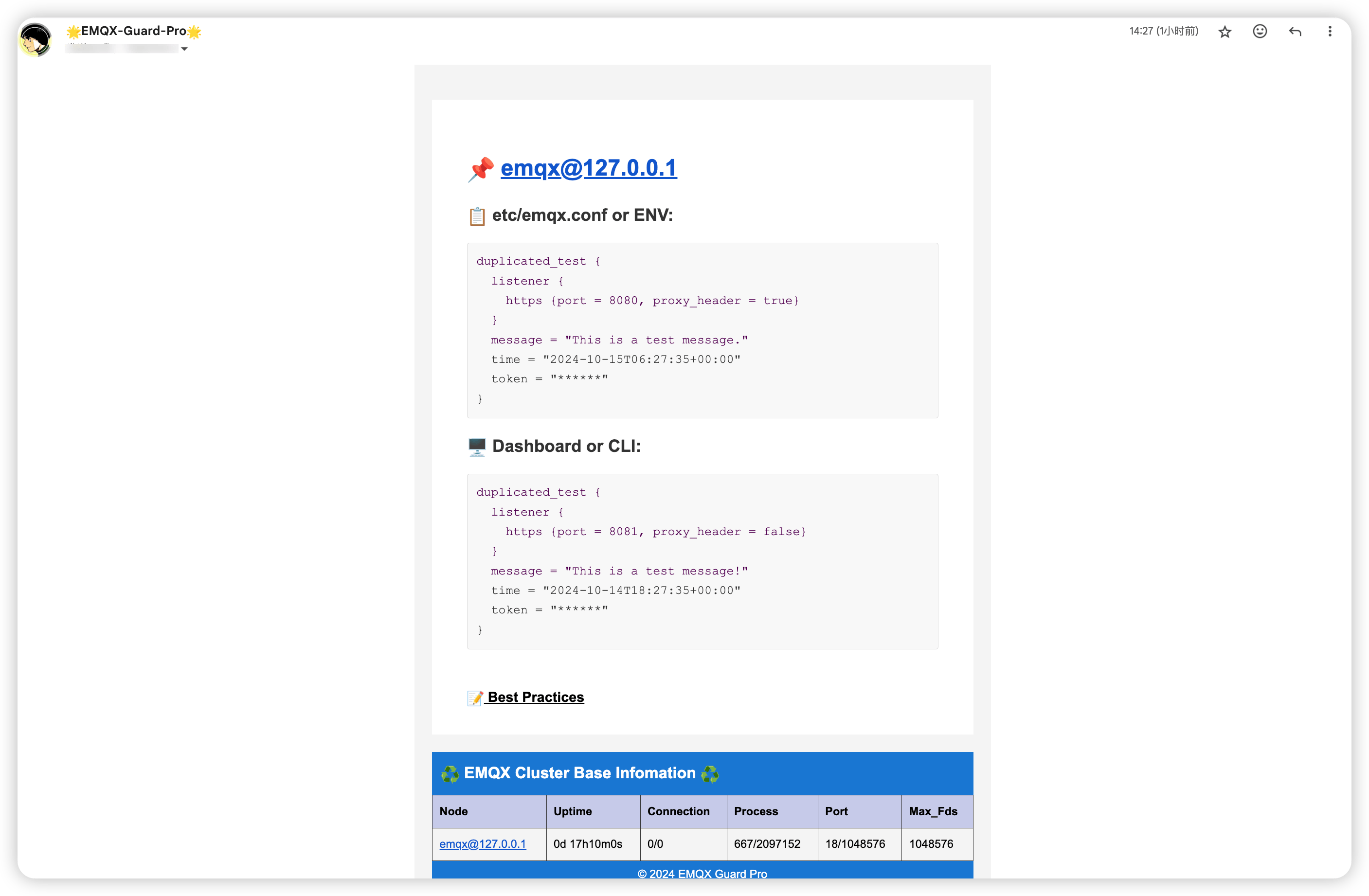
Another Potentially Hazardous Scenario
Let's examine another common pitfall related to duplicated configurations:
Initial Setup:
You configure authorization rules in the etc/emqx.conf file to reject unauthorized clients.
This typically involves setting parameters like deny_action = disconnect, no_match = deny, and sources = [].
Runtime Modification:
While EMQX is running, you modify the authorization.sources setting to built_in_database through the EMQX Dashboard.
At this point, the system functions as expected, and authorization is handled by the built-in database.
The Problem Arises:
After a prolonged period of operation, the EMQX cluster undergoes a restart.
Upon restarting, all clients are suddenly unable to log in. This occurs because the authorization.sources setting in the etc/emqx.conf file is still empty (sources = []), and this configuration overrides the Dashboard setting during startup.
Recommended Solution:
Avoid configuring the authorization.sources setting directly in the etc/emqx.conf file.
Instead, manage the authorization.sources setting exclusively through the EMQX Dashboard.
How To Fix ?
- Identify Duplicated Configurations: Carefully review your EMQX configuration settings across environment variables, the
etc/emqx.conffile, and the Dashboard/CLI. Look for instances where the same configuration item is defined in multiple locations. - Remove from
etc/emqx.conf: Once identified, remove the duplicated configuration items from theetc/emqx.conffile. - Restart the Cluster: After removing the duplicated entries, restart the EMQX cluster. The configuration will now be loaded correctly based on the defined priority.
Best Practices for EMQX Configuration Management
To maintain a clean and manageable EMQX configuration, adhere to the following best practices:
1️⃣. Define Core Node, Cluster, and Dashboard Settings in etc/emqx.conf: Configure fundamental settings related to the EMQX node itself (e.g., node name), cluster formation, and Dashboard access within the etc/emqx.conf file.
2️⃣. Manage Most Other Settings via Dashboard/CLI: Utilize the EMQX Dashboard or the emqx_ctl command-line interface for configuring the majority of other settings. This approach allows for dynamic updates without requiring server restarts for many parameters.
3️⃣. Use etc/emqx.conf Only When Necessary: Limit the use of etc/emqx.conf to specific scenarios where:
- The desired setting is not available for modification through the Dashboard or CLI.
- The setting is inherently specific to individual nodes within the cluster and should not be applied cluster-wide.
- The setting is not intended to be changed frequently at runtime.
The EMQX Dashboard applies configuration changes across the entire cluster.
For making configuration changes that are specific to a single node, you can utilize the etc/emqx.conf file.
For example, you might temporarily set the log level of a single node to debug (log.file.level=debug) while keeping other nodes at log.file.level=warning for temporary tracing purposes.
Important Note: This method of using etc/emqx.conf for single-node changes should be considered a temporary solution. Long-term reliance on this approach can complicate configuration management and may lead to conflicts with configurations managed through the Dashboard.